




AICKO PLAYER is a free media player for Windows 10 and 11 that plays video and music in a wide range of formats. It supports playlists, subtitles and resuming where you stopped. Also, it needs no account.
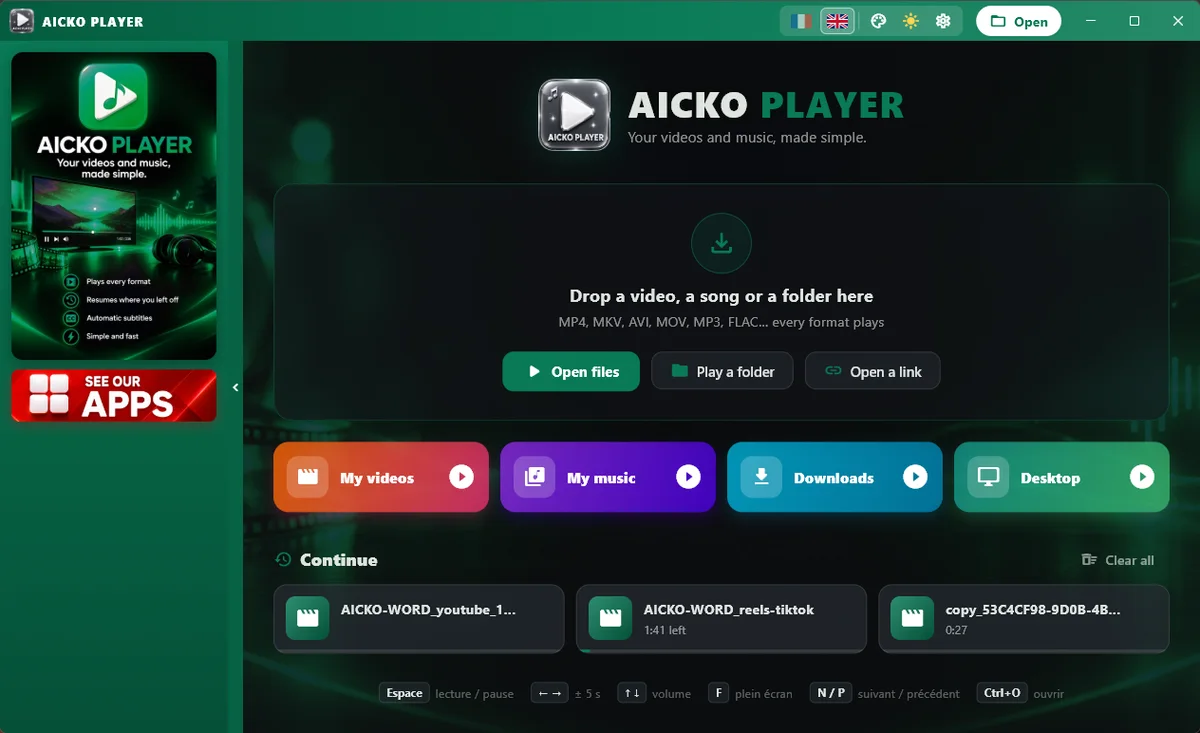
Instead, it is built around the options people really use, with a clean dark design and quick access to the Videos, Music, Downloads and Desktop folders. Besides, it opens a very wide range of file types.

Get AICKO PLAYER
At a glance
- Platform: Windows 10 and 11
- Price: free
- Media: video and music
- Subtitles: automatic
- Resume playback: yes
- Languages: French and English
A free media player for Windows that remembers
Families switch between cartoons, school videos and music all week. Therefore, AICKO PLAYER keeps a history of where you stopped in every file, so a lesson video resumes at the same second the next day. Moreover, its playback engine, libmpv with FFmpeg, is known for opening very different file types, and a file chosen by hand is always attempted.
Features
- A queue and playlists, with shuffle and repeat, and drag and drop.
- Automatic subtitles from the file next to the video, and a menu to choose tracks.
- Audio language, speed, and fit, fill or stretch picture modes.
- Screenshot of the current frame, saved in your Pictures folder.
- Always on top, full screen, mouse wheel for volume, click to pause, double-click for full screen.
- Keyboard shortcuts and links to online streams.
- Dark or light look, eight colours, French or English.
Watch a lesson video, step by step
- Install AICKO PLAYER from the Microsoft Store.
- Then open a video or drop it onto the window.
- Next, slow it down to 0.75 if the explanation goes fast.
- After that, turn on subtitles if you have a subtitle file.
- Finally, take a screenshot of the diagram you want to keep.
Next time you open the file, it picks up where you stopped.
Why it fits Planète Maths
Many teachers and parents share video explanations of the same topics you find in our math lessons. Therefore, a player that slows down speech, resumes automatically and captures the board helps a child study at their own pace. After the video, you can also try the matching practice pages.
Study and relax with the same player
For a lesson video, use the slow speed, the subtitle track and the screenshot button. For music, build a queue, switch on shuffle and let it play. In addition, the wheel changes the volume, a click pauses, and a double-click opens full screen. Fit, fill and stretch modes also let you adapt a video to your screen, and the always-on-top option keeps a clip visible while you work.
Besides, you can paste a link to a stream and play it directly.
Simple controls for all ages
A grandparent can learn the player in a minute: click to pause, double-click for full screen and use the wheel for volume. Similarly, children can drag a folder of songs onto the window and press play. Because the program saves the history, nobody has to remember the time code of an interrupted film.
Your user data folder keeps your settings, such as colour, language and the dark or light look, in the same way as the other AICKO programs.
Honest limits
AICKO PLAYER is made for local files and links, not for a streaming catalogue. However, you have to set it as the default program yourself in Windows settings, because Windows protects those choices. Finally, it runs on Windows 10 and 11 only.
Frequently asked questions
Is there a free media player for Windows 10 that remembers my position?
Yes. AICKO PLAYER is free in the Microsoft Store and keeps a history of the position in each video or song, so playback resumes where you stopped the last time.
Does AICKO PLAYER support subtitles?
Yes. It picks up a subtitle file placed next to the video and offers a menu to choose between tracks. You can also change the audio language when the file has several, and adjust the speed.
Can AICKO PLAYER play music as well as video?
Yes. It plays both, with playlists, shuffle and repeat. You can open files one by one, drag them onto the window or jump to the Videos, Music, Downloads and Desktop folders.
Does AICKO PLAYER need an account or internet?
No. It needs no account, and playback of local files works offline. You can open an online stream by pasting a link, but nothing is required to start using the program.